Image TranslatorImage Translator
Japanese to English for kanji, kana and vertical text

Japanese to English Image Translator

To translate a Japanese image to English, upload a clear photo, screenshot or scan. Japanese and English are preselected. Keep vertical columns and nearby notes in the frame, then compare the result with the original to check reading order, yen prices, names and any important warnings.

Start with 30 free credits — translate up to 3 images, no payment required.

Upload Images

Drag and drop images here, or click to browse

Supports JPG, JPEG, PNG and WebP · Upload one or multiple images

Read vertical Japanese, menus and labels in English

Japanese images often mix vertical writing (tategaki), horizontal notes and numbers. Keep enough of the image to see which text goes together. A menu price belongs to a particular dish, and a line of small kana may tell you how to read the kanji beside it.

From source image to reviewed English

  1. Capture complete columns and quiet backgrounds

    Photograph a menu straight on and move away from glare before you crop. Keep the section heading, entire dish column, its price and any tax note together. For manga, keep the panel border and nearby bubbles. When furigana or strokes are hard to distinguish, retake the photo closer or use a sharper scan.

  2. Trace the order in the source first

    In standard vertical Japanese, read each column from top to bottom and move from right to left across its text block. Treat a nearby horizontal footnote as its own block. On menus, use dividers and section headings to identify the groups. On manga, check who speaks in each bubble before asking for short horizontal English.

  3. Keep the Japanese and English presets

    Upload one representative image with Japanese as the source and English as the target. For an unfamiliar dish, use a romanized name plus a short explanation when the source supports it. For products, include any approved brand spelling in Custom Prompt and ask for quantities and values to stay with their original rows.

  4. Compare the result in the source order

    Follow the original menu or panel one block at a time. Check each price, unit, speaker and footnote against the corresponding English area. If columns are merged, crop one complete section and try again with the column order in the prompt. Read the translated result at the size you plan to use.

Compare the images at full size

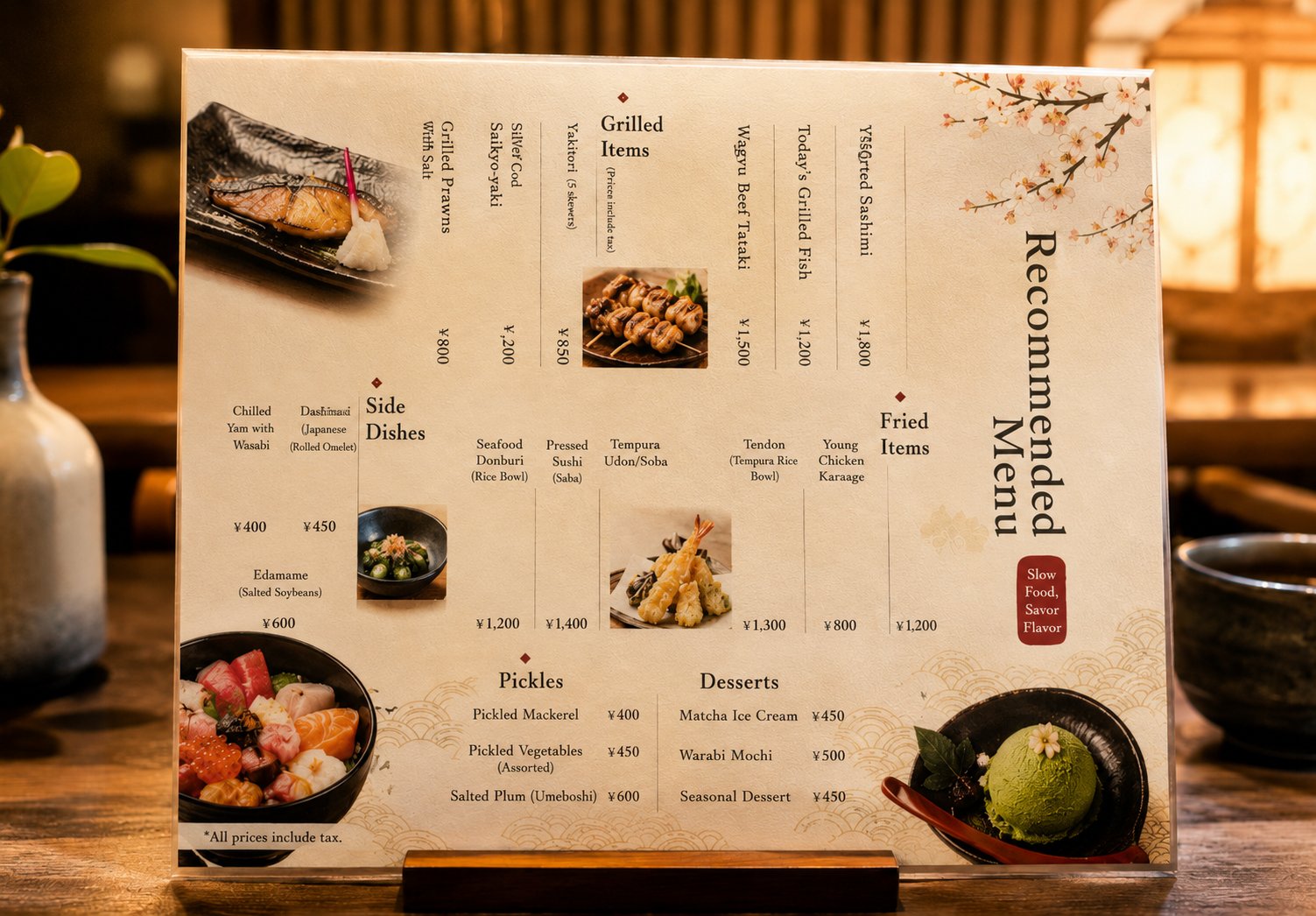
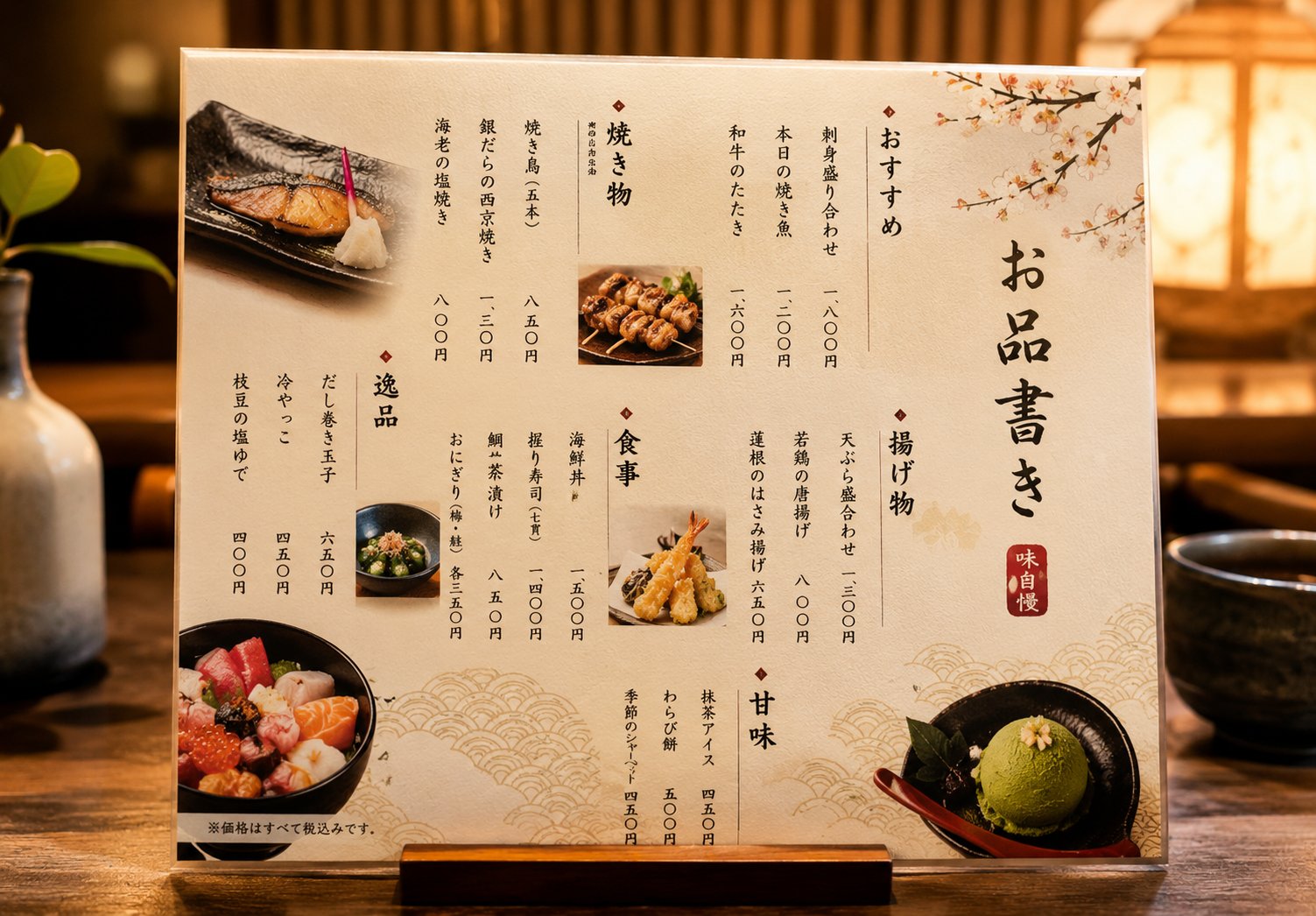
Izakaya menu with vertical yen prices

Japanese izakaya menu with vertical dish names, yen prices and a horizontal tax note
Japanese menu
English menu sample with reflowed dish names and a changed price for Wagyu Beef Tataki
English draft with price errors

In these sample images, the original 和牛のたたき reads 一、六〇〇円 (¥1,600), while the English draft shows ¥1,500 for Wagyu Beef Tataki. The yakitori price reads 八五〇円 (¥850) and stays ¥850 in the draft. Check every dish and price individually, then confirm tax and allergens with the restaurant.

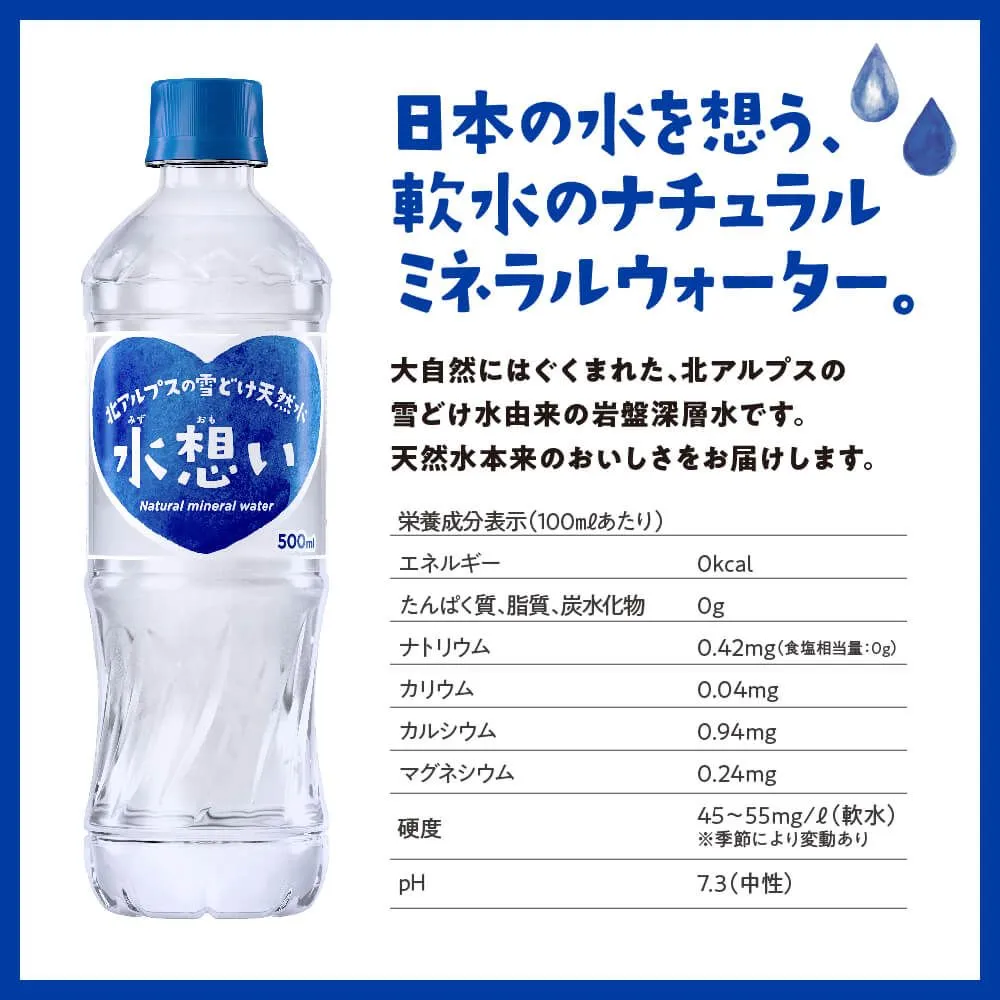
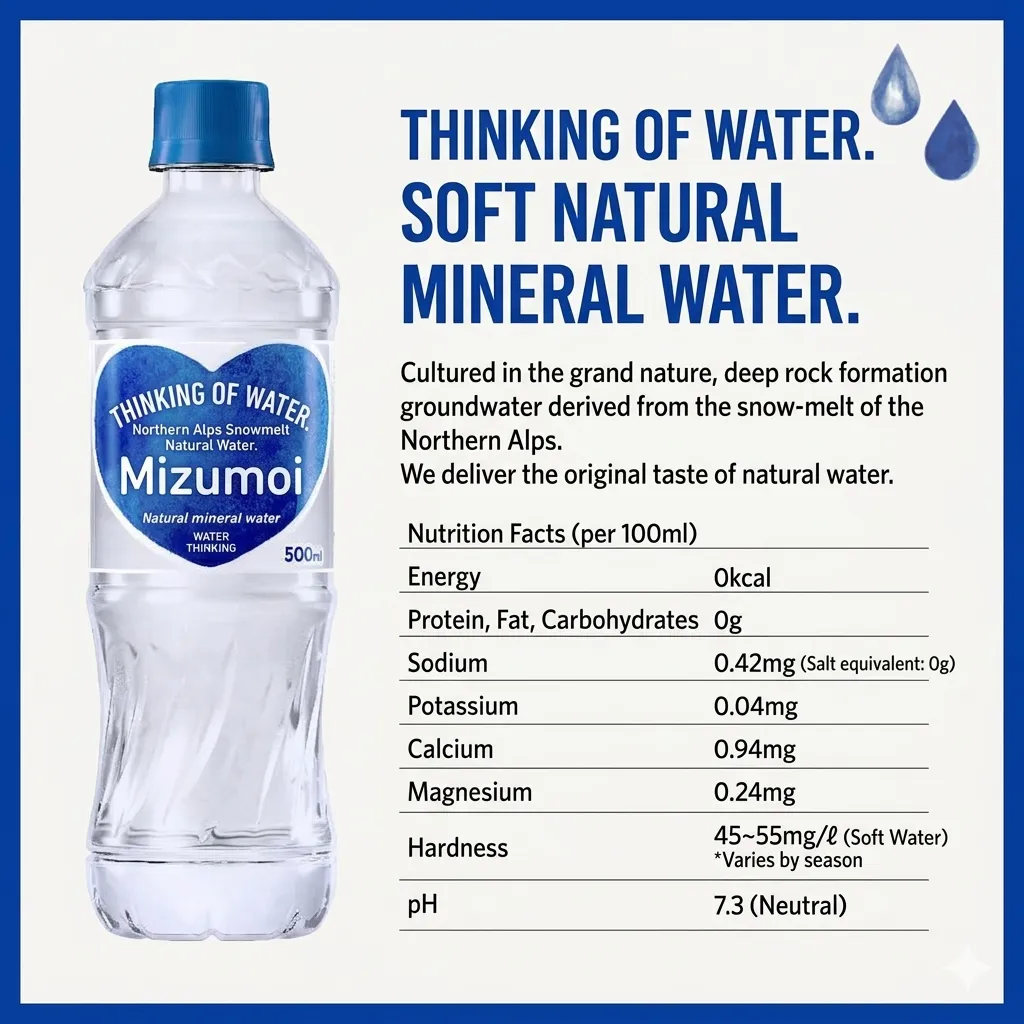
Water label with a nutrition table

Japanese water label with a 500 mL bottle and nutrition values per 100 mL
Japanese product image
English water label sample with sodium listed as 0.42 mg per 100 mL
English label draft

The front of the bottle shows 500 mL. The nutrition panel is per 100 mL and lists sodium at 0.42 mg. The English example retains both quantities, but it also romanizes the brand on the bottle. Verify the official spelling and check the serving basis, each decimal and the note below the hardness value before reusing the image.

Custom Prompt templates

In the uploader, open Custom Prompt and paste the template that fits your image. The box accepts up to 500 characters and applies the same instructions to the selected images. Edit the terms before submitting and check the output against the original.

Vertical menu with prices

Read each vertical Japanese block top to bottom and its columns from right to left. Translate dish names into concise English. Keep each price in yen with its own dish and keep tax and portion notes. Leave unclear text unchanged. Do not infer ingredients.

Manga bubbles and furigana

Use short natural English in each speech bubble. Keep the original panel and speaker order. Use furigana to read names when legible. Keep the spelling from the supplied glossary and leave sound effects drawn over the artwork unchanged.

Packaging and product data

Translate the Japanese headings and readable label text. Keep the brand, model, ingredients, batch code, decimals and units faithful to the source. Keep the serving basis and each value in its original row. Do not add health or safety claims.

Review checklist before sharing

CheckCompare with the source
Vertical order and readingTrace each column from top to bottom and verify which column follows. Check furigana and proper names against an approved spelling when the reading matters.
Dish, price and tax noteCompare each dish with its own yen amount, including kanji numerals, set sizes, per item pricing and tax wording. Confirm current prices with the restaurant.
Ingredients and allergensVerify ingredients, allergens and warnings with staff or the manufacturer. A dish name alone cannot tell you about broth, seasonings or cross contact.
Label values and model numbersCheck each brand, model, serving basis and unit in the original. Confirm decimals and similar characters such as 0 and O before sharing a translation.
English fit and speaker orderCheck for rotated or clipped English and words that cross column or bubble boundaries. Keep each line with the correct speaker or section.

Limits and credits

Brush lettering, tiny furigana and glare can hide strokes that change the meaning. A clean looking result can still move a price or miss a warning. Keep the source nearby, and have a fluent reviewer or the responsible business verify prices, model numbers, ingredients and safety instructions before you rely on them.

Image Translator supports 132 languages. Upload JPG, JPEG, PNG or WebP files up to 20 MB each and 4096 px on the longest side. A batch can contain up to 10 images and 5 target languages.

New verified accounts receive 30 free credits. Each image costs 10 credits per target language, so three images with English as the only target cost 30 credits. Failed tasks automatically return their credits.

Built for this task

Images you can translate

Private tasks 132 languages

Manga panels

Translate dialogue within each bubble and review who is speaking in the original panel order.

Japanese menus

Translate dish names written in kanji and katakana into English.

Product packaging

Understand product names, ingredient lists and visible instructions.

Travel signs

Read mixed-script station, street and notice signs when travelling in Japan.

What you get

01

Vertical text (tategaki)

Translate legible vertical text. Compare the English placement with the original columns, especially where a horizontal note crosses a vertical block.

02

Mixed scripts

A single image can contain kanji, hiragana and katakana. Small furigana and stylized lettering benefit from a sharper source.

03

Manga reading order

Keep panels and their speech bubbles visible when you upload. Check speaker order and line breaks in the result.

Frequently asked questions

Questions about Japanese to English Image Translator

How do I translate a Japanese image to English?+

Upload a readable image and run the task with the Japanese and English presets. Open the original beside the result and review the text one block at a time.

Can it handle kanji, hiragana and katakana together?+

Yes. One image can contain all three scripts. Check readings for names, look for missed small characters and retake blurry areas when needed.

Does it translate Japanese vertical text in manga?+

It can translate legible vertical dialogue. Compare the output with the original panel sequence and check that the English fits in each bubble.

Can I use the English translation of a Japanese menu to order?+

Use the result to get oriented. Match each dish and yen price to the original and confirm current prices, ingredients and allergens with the restaurant.

How is this different from the Japanese Image Translator?+

This page preselects Japanese as the source and English as the target. The Japanese Image Translator starts with Japanese and lets you choose the target.

Which image formats can I upload?+

The uploader accepts JPG, JPEG, PNG and WebP images. You can add up to ten images in one upload flow.

Free credits to start

Start translating Japanese images today

Translate Japanese menus, manga and packaging into English. Learn how to review vertical text, yen prices and product labels against the original.