
Upload your label photo
Drag and drop a JPG, JPEG, PNG or WebP label photo into the uploader, or click to browse. You can add up to ten images in one upload flow.
Translate label photos and packaging text. Compare actual care-label results, check codes and units, and review wording before downloading a translated image.
Start with 30 free credits — translate up to 3 images, no payment required.
Drag and drop images here, or click to browse
Supports JPG, JPEG, PNG and WebP · Upload one or multiple images
Step by step
Drag and drop a JPG, JPEG, PNG or WebP label photo into the uploader, or click to browse. You can add up to ten images in one upload flow.
Pick one or more target languages — the source is detected automatically from the image.
Compare every text area, model and measurement with the source. Download the reviewed file, then preview it in your store before publishing.
From a package photo to a reviewed visual reference
A product title can look convincing while a care line changes meaning or a lot code loses a character. Use this label translator to create a translated image, then compare every printed field with the original. For a seller or brand team, the useful output is a checked visual reference for the next review, not an automatic approval of the physical packaging.
If glare covers a word, retake the photo from another angle or change the lighting. If the original small print is unreadable at full size, enlarging the file does not restore that missing information. Try a closer complete panel rather than asking the translator to invent an obscured line. The examples here have readable print; they do not establish performance on microscopic or hidden text.
This fictional Chinese travel cup is an AI generated source example. Its English results were produced by Image Translator on 15 October 2026 and reviewed again for this guide. The source and the second, corrected output are shown in full.
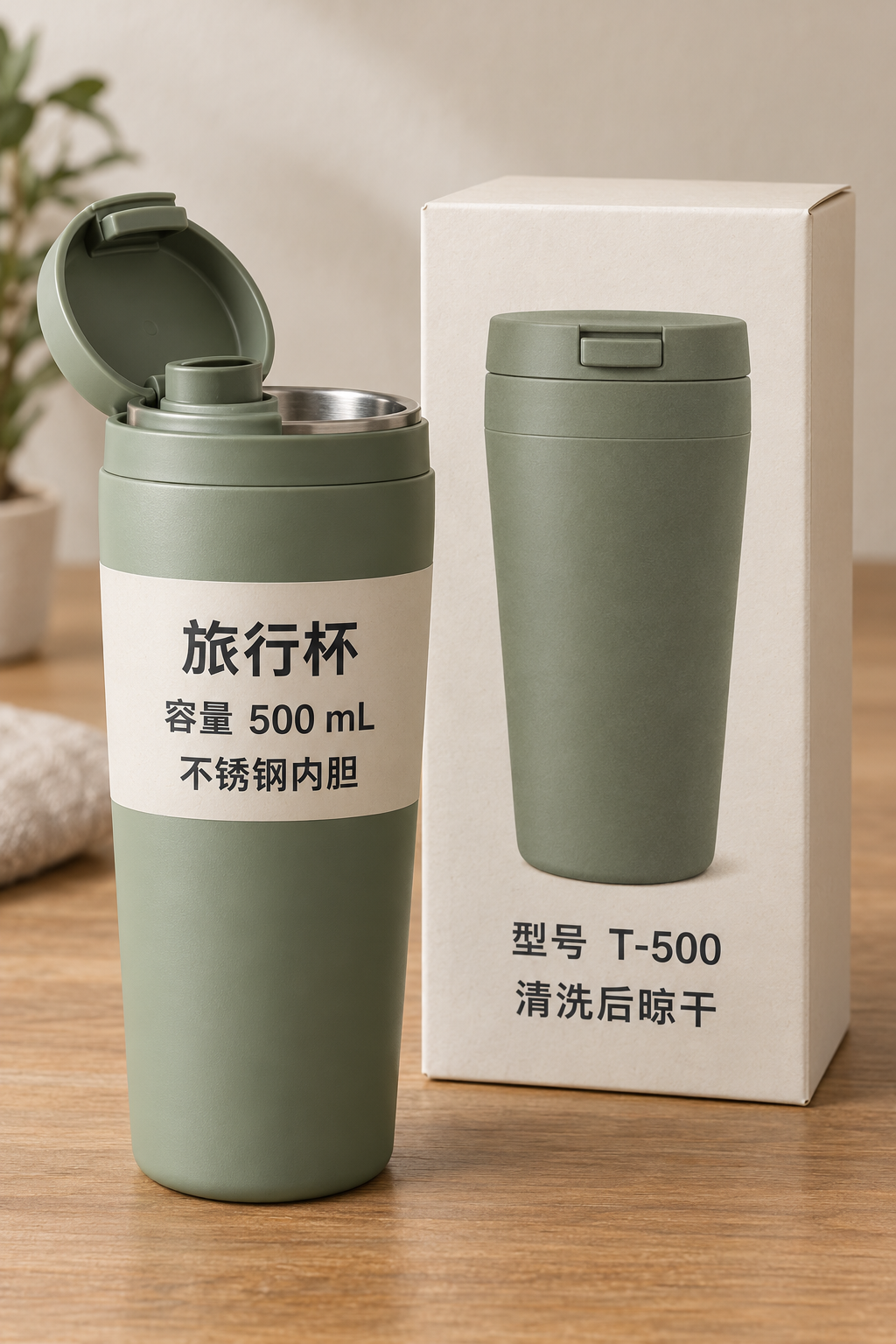
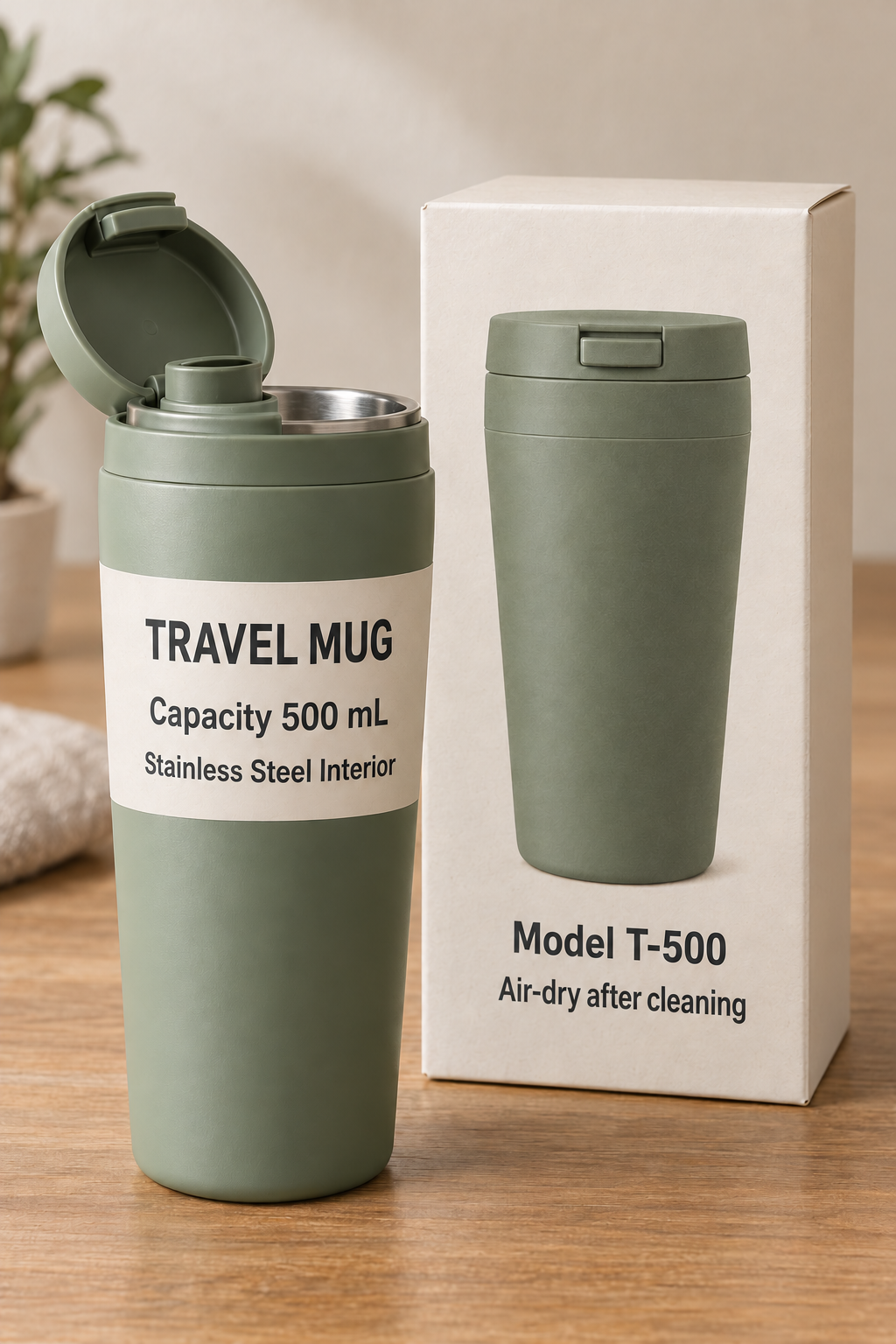
容量 500 mL becomes “Capacity 500 mL”. 不锈钢内胆 becomes “Stainless Steel Interior” in the reviewed output. The shorter Chinese material line and longer English wording occupy different space on the curved label. Check the edges as well as the center: a readable capacity line does not prove the material line is complete.
The source box says 清洗后晾干: air dry after cleaning. The first actual output instead said “Rinse and use after cleaning”, losing the drying action. That result needs correction even though processing completed. The second actual run used the instruction below and produced “Air-dry after cleaning”.
Translate 清洗后晾干 exactly as “Air-dry after cleaning”. Keep model T-500 and capacity 500 mL unchanged. Do not add instructions to rinse or use the cup.
The material wording and typography also changed between these runs. Recheck the whole second image instead of approving it solely because one instruction improved. The enlarged details above are live crops of the linked full images, not separately generated translations or a higher resolution reconstruction. They make comparison easier; they do not recover unreadable source text.
SAMPLE GOODS is a fictional example brand. This AI generated English cloth label was translated into Spanish on 5 November 2026 using the Image Translator. The instruction preserved the brand, item and lot codes, measurements, percentages and washing temperature while translating the fiber names and care sentences. The actual output is shown below.
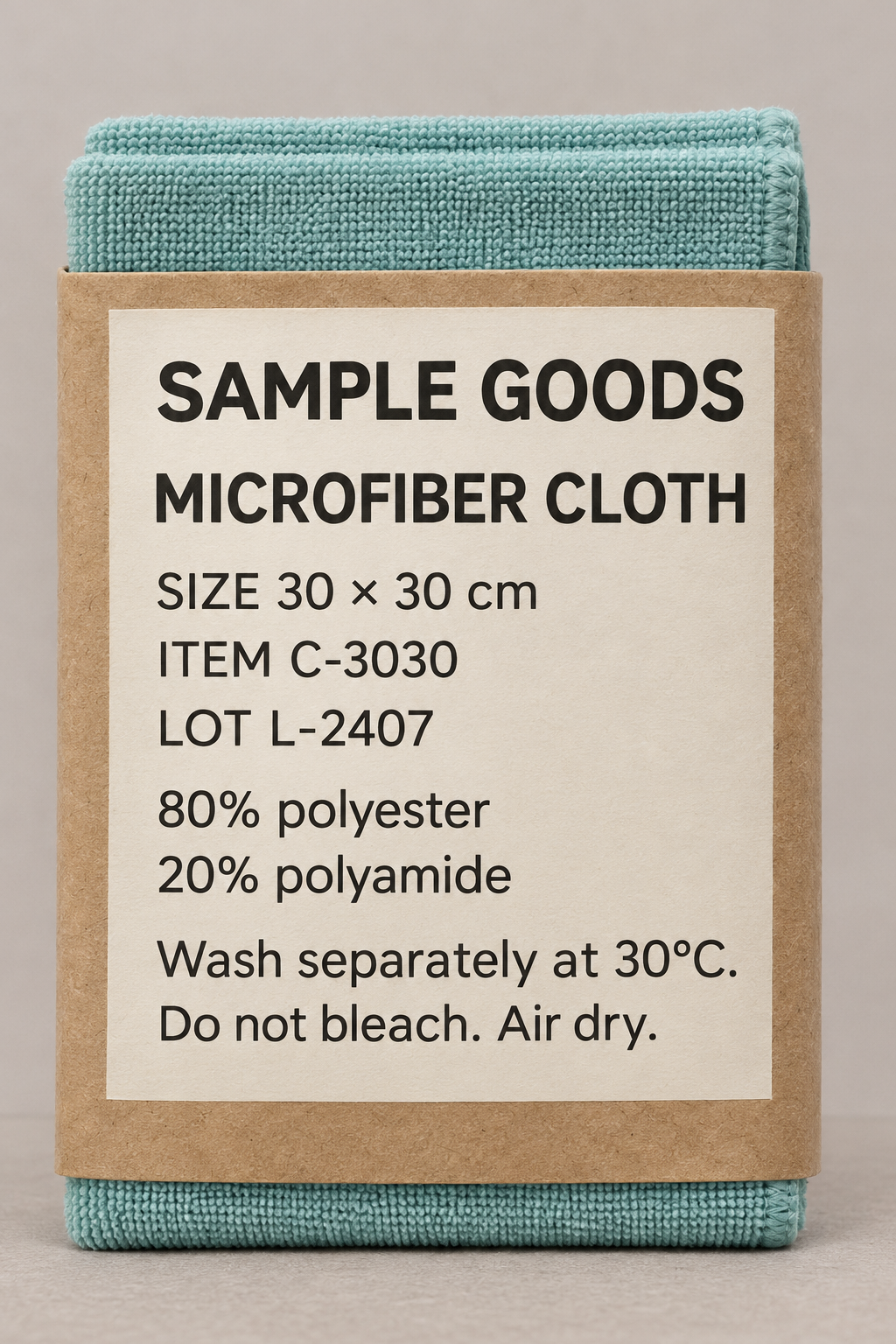
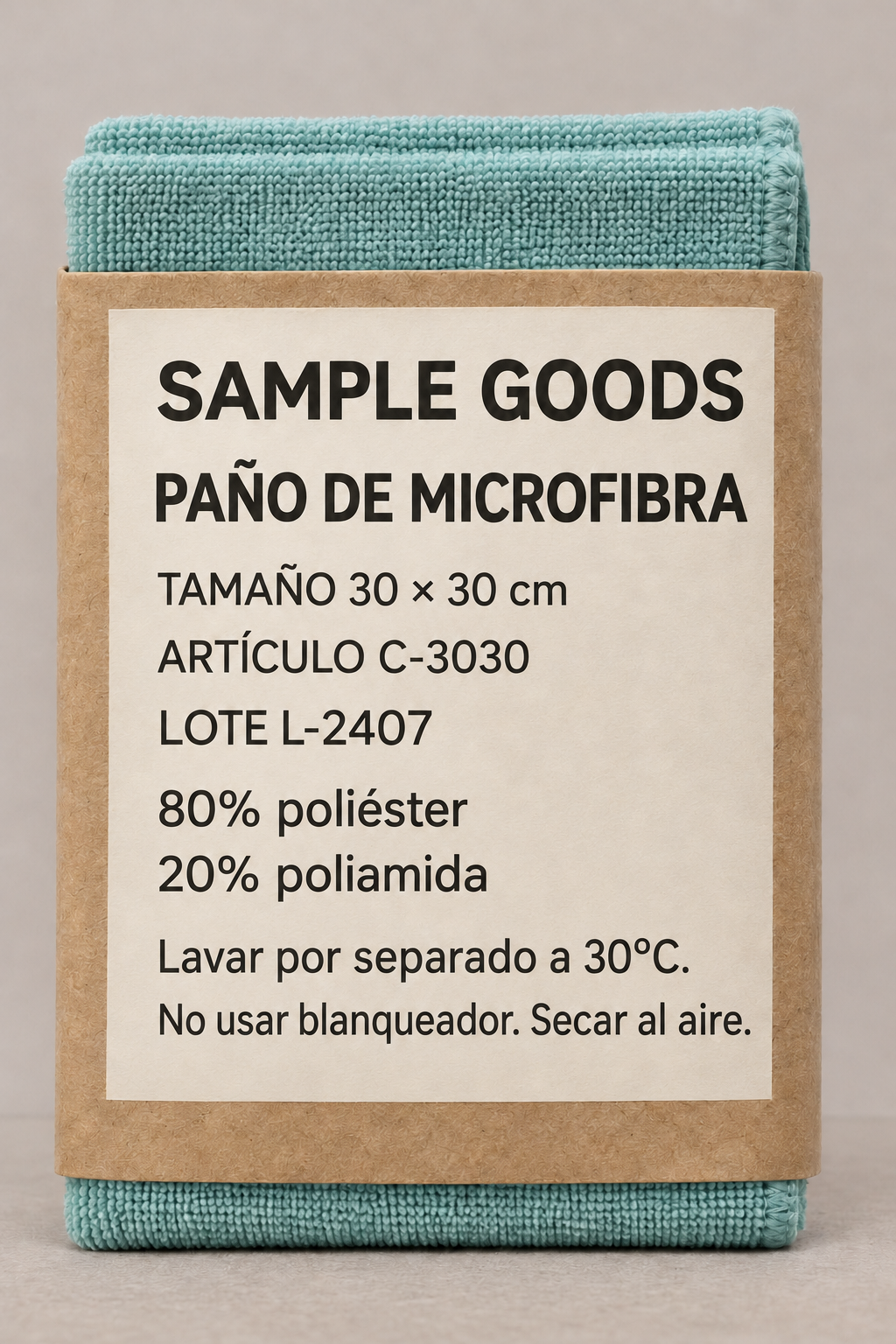
The actual output keeps SAMPLE GOODS, C-3030, L-2407, 30 × 30 cm, 80%, 20% and 30°C. It reads “80% poliéster”, “20% poliamida”, “Lavar por separado a 30°C.” and “No usar blanqueador. Secar al aire.” The last care line uses more words but remains on one line here. Check its readability at the size you will display it. These are invented sample composition values, not material testing or an approved label for a real product.
Write preservation instructions from an approved product record. Do not invent a preferred fiber, temperature or material claim simply because the generated sample contains one. In Custom Prompt, identify exactly which words are brand text and which strings are references; the model still needs visual review. The field accepts up to 500 characters.
| Field | Check against the source | If it differs |
|---|---|---|
| Identity | Brand spelling, item/model, lot or batch code | Reject a changed identifier; compare each character. |
| Quantities | Capacity, dimensions, percentages and temperature | Keep values and units attached; do not silently convert them. |
| Instructions | Every action, sequence, condition and negative word | Revise the affected wording; recheck the new complete image. |
| Surfaces | Cup, box, back panel and any cropped edges | Add a clearer view for hidden or unreadable text. |
| Presentation | Line breaks, pointer relationships and product appearance | Preview at the actual display size and in full context. |
Review every separate text area, including a short line below a model or on another package face. The output is a rendered image, not editable OCR text, a print dieline or a certification that the label is ready for sale. Food, cosmetics and other regulated labels need the appropriate product and market review; these ordinary cup and cloth examples do not test ingredients, allergens, nutrition panels or medical instructions.
The current rate is 10 credits per image and target language. One photo of a cup and its box into one language is one task: 10 credits, not a separate charge for each printed surface. Two separate photos into one language use 20 credits; into two languages they use 40. A new completed output after a wording change is another paid task. Failed tasks return credits, sometimes after a pending period; check the status and balance before resubmitting.
Keep the original file and a clearly named reviewed copy. Compare completed results, use Download for each image, then check the saved file in the listing or review document where it will appear. For a known wording problem, submit the affected image and target with revised instructions. Regenerate uses the previous settings. The cup and cloth here have different source and target directions; run them separately rather than assuming one shared manual source setting fits both.
For several package views, the batch workflow explains included files and task counts. Use the product image review for catalog and SKU checks, or Chinese to English examples for supplier wording. For camera framing, follow the photo preparation guide; current plans and credit rules cover larger jobs.
Built for this task
Create a translated visual reference from readable product and care labels. Check every surface, identifier, value and instruction against the source before using the image.
Compare the cup front separately from its box. Inspect the capacity and material wording at the edges of the curved label.
An actual first cup output lost the drying action. The reviewed second output restores it; the full new image still needs checking.
Use the English to Spanish cloth label to inspect a fictional brand, item and lot codes, fiber percentages, temperature and care text.
Prepare a complete readable view of each panel. The examples here do not demonstrate nutrition, allergen or medical-label verification.
What you get
The label text is rendered back into an image. Check the cup, box, panel edges and smaller instructions instead of approving only the headline.
Specify brand spelling, codes and values in Custom Prompt, then compare every character in the actual output. The instructions are not a locked glossary.
A close view helps review readable text; it cannot recover a hidden or blurred line. Keep the full package context and obtain a clearer photo when needed.
Frequently asked questions
The current cost is 10 credits per image and target language. Three labels into one language use 30 credits; into two languages, 60 credits. A one-time credit pack is available without a subscription.
Use custom instructions to specify names or terms to keep. Check numbers, references and translated terms in the result; instructions do not guarantee exact reproduction.
Upload a JPG, JPEG, PNG or WebP, choose the source and target language, and add preservation instructions if needed. Submit from a verified account with enough credits. Compare all text areas and package details before downloading the rendered image.
Yes. Choose English to translate visible product names and instructions, then review both the wording and the packaging image.
The tool can attempt readable label text, but the worked examples here are a cup and a fictional cloth care label. They do not verify ingredients, allergens, nutrition panels, standardized care symbols or regulated content. Use the appropriate product and market review before publication.
Yes. Straight, well-lit photos of labels translate most reliably; small text on curved packaging may need a sharper shot.
The service aims to preserve the composition, but longer translated text and AI reconstruction can change placement or background details. Review the result before publishing.
The tool is meant for everyday understanding, not professional medical or regulatory advice. Always verify regulated content with a qualified professional.
Continue exploring
Free credits to start
Translate label photos and packaging text. Compare actual care-label results, check codes and units, and review wording before downloading a translated image.